Sync and Share Zendesk Contacts Through Google Workspace, Saving on CRM Costs and Streamlining Workflow


On average email users globally have 1.75 email addresses, according to Convince&Convert. Many working adults )end up having a “spam email” for subscriptions of all sorts, an “important” email address for sensitive financial transactions, and a corporate/business inbox on top of that.
This is your step-by-step guide to all things Gmail forwarding functionality.
How to automatically forward emails to multiple recipients in Gmail
With all the exponential growth of email accounts in one’s life, comes the responsibility of control not to miss important correspondence. Which makes a user look for the answers to a highly technical question: How to automatically forward emails in Gmail to multiple recipients.
Helpful tip
Whatever your reason to forward the email to multiple addresses, this is how you do it in Gmail and Workspace.
You only choose to have one mail account on your phone but you need to make sure you check all messages on the go if needed – from all of your accounts. On your vacation, for example.
In private life, you may want to forward specific emails, like some financial notifications for a house you all live in with your family.
How to Set Up Automatic Email Forwarding to Multiple Recipients
This is a 2-step process, as you will need to first enable forwarding to one account and then create filters to enable Gmail forward to multiple emails.
Forwarding the Emails in Gmail (Single Recipient Only)
You can only perform this on the desktop version of Gmail, so to enable email forwarding to go to your Gmail account from your computer.
-
Open Settings by clicking the gear icon in the top right.
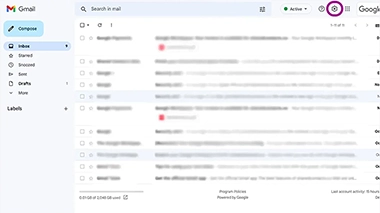
-
When a sidebar with quick settings appears, click See all settings.
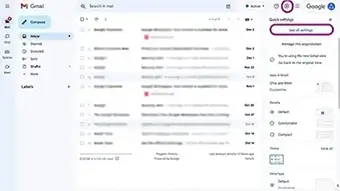


How to Create a Filter to Forward Emails to Multiple Recipients
You can access the filter creation option from the same segment: Gmail > Settings > See all settings > Forwarding and POP/IMAP > Forwarding. You will see this prompter at the bottom of this short segment: Tip: You can also forward only some of your mail by creating a filter!

We recommend users add and verify all possible email accounts to the list of forwarding addresses just in case, as if you don’t always have direct access to an inbox, verification may take time. Remember that you can add multiple forwarding addresses, but you can only forward your emails to a single email without the filtering option.
You only choose to have one mail account on your phone but you need to make sure you check all messages on the go if needed – from all of your accounts. On your vacation, for example.
In private life, you may want to forward specific emails, like some financial notifications for a house you all live in with your family.
| B2B Contact Databases | Aspect | B2C Contact Databases |
|---|---|---|
| Company-level information: organizations and key stakeholders. | Primary Focus | Individual customer information – personalized customer profiles. |
| Industry, company size, job roles, decision-makers, purchase history. | Data Tracked | Purchase history, browsing behavior, demographics (age, location), preferences. |
| Building relationships with companies, supporting B2B sales and marketing. | Goal | Building relationships with individual customers, supporting B2C marketing and personalization. |
| Provides insights into organizational structure and decision-making. | User Insights | Provides insights into customer preferences and purchasing habits. |
| Adapted to industry, job role, and company needs; often formal and information-rich. | Communication Approach | Adapted to personal interests, past behavior, and demographics; often more personal and engaging. |
| Targeted email campaigns to companies, lead generation, and account-based marketing (ABM) strategies. | Examples of Use | Personalized marketing, loyalty programs, and customer retention campaigns. |
| Allows team access to a full view of each client organization’s interactions and purchasing patterns. | Allows team access to a full view of each client orgCentralized Databaseanization’s interactions and purchasing patterns. | Allows team access to a unified view of each customer’s interactions and preferences. |
| Long-term partnerships, increased client retention, and personalized business solutions. | End Goal | Better customer loyalty, repeat purchases, and personalized customer experiences. |
| Company-level information: organizations and key stakeholders. | Primary Focus | Primary Focus | Primary Focus |
| Industry, company size, job roles, decision-makers, purchase history. | Data Tracked | Data Tracked | Data Tracked |
| Building relationships with companies, supporting B2B sales and marketing. | Goal | Goal | Goal |
| Company-level information: organizations and key stakeholders. | Primary Focus |
| Industry, company size, job roles, decision-makers, purchase history. | Data Tracked |
| Building relationships with companies, supporting B2B sales and marketing. | Goal |
FAQ
Can I Add Multiple Forwarding Addresses in Gmail?
Yes, you can add multiple forwarding addresses in Gmail and get them verified, but you can’t set forwards to these multiple addresses. You can only use one account in this functionality. Users may use the filtering option to enable automatic forwarding to multiple accounts.
Why Forward Emails to Other Accounts?
Corporate users often need to forward their correspondence to other users not to miss a sale or an urgent business even in the absence of one employee for rest or sickness. Other private usage examples include the convenience of checking one account only vs keeping an eye on many.

3 Comments
I actually ended up finding out about this functionality by falling into one of the internet’s rabbit holes – and voila! My vacations are much more enjoyable now – as my 2 people team takes care of all the routine stuff and messages me for anything urgent. It’s pretty convenient!
I actually ended up finding out about this functionality by falling into one of the internet’s rabbit holes – and voila!
Hey that's super nice glad it helped!